
Blog · Paid Search
Paid SearchThe three Performance Max levers most accounts get wrong
Asset groups, audience signals, and exclusions are the only PMax inputs you actually control. Most accounts use one of them well, two of them carelessly, and the third one not at all.
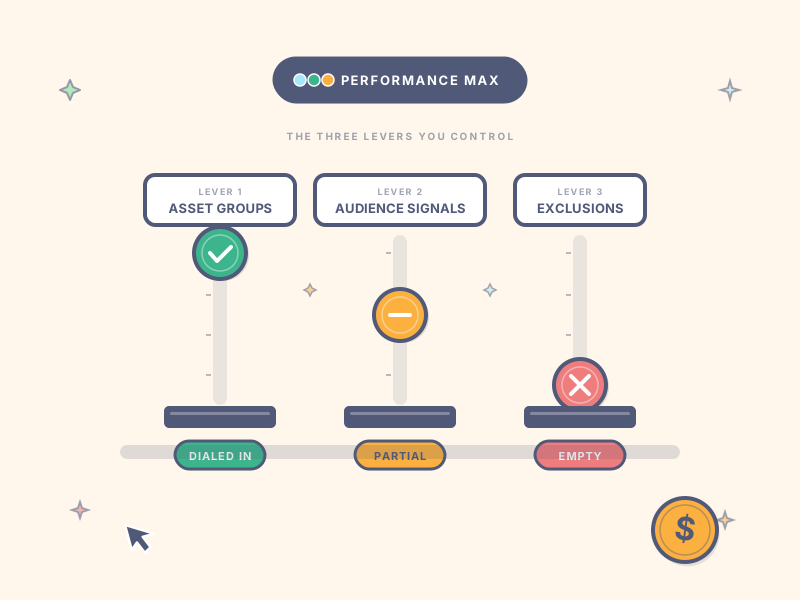
If you’ve spent any time managing Google Ads, you’ve felt the appeal and the frustration of Performance Max at the same time. It promises automated reach across Google’s full inventory. It also strips away most of the controls you spent years learning to use. The combination produces a fairly common reaction: “this isn’t really a campaign — it’s a wager.”
That reaction isn’t wrong. But it isn’t the full picture, either.
Performance Max has three real levers. They don’t give you the granular control of standard search. They do give you meaningful authority over what your spend chases and what it ignores. Most accounts treat one of them carefully, use the second one carelessly, and never touch the third. Fixing all three is what turns PMax from a wager into a campaign you can actually manage.
Lever 1: Asset groups
The first thing most accounts get wrong is the one most agencies get partially right.
An asset group is a bundle of headlines, descriptions, images, videos, and a final URL — Google’s machine learning then matches that bundle against queries, audiences, and placements it thinks are likely to convert. The mistake is bundling too much into one group. A common pattern: one asset group containing every product line, every promotion, and every customer-segment-targeted creative.
When everything is one bundle, PMax has no way to learn which queries should pull which creative. The algorithm gets fed contradictory signals — a discount-driven asset competing with a premium-positioning asset for the same query — and it averages everything into a mediocre middle.
The fix: one asset group per distinct buyer intent. If you’re an ecommerce brand with five product categories that solve different problems, that’s five asset groups. If you’re a B2B SaaS with three different ICPs, that’s three asset groups — and possibly more, broken further by stage of awareness.
The signal you want PMax to receive is “this asset group is for buyers who want X.” Not “this asset group is for any buyer who might want anything we sell.”
Lever 2: Audience signals
This is the most misunderstood lever in the entire interface.
The interface calls them “audience signals” and most marketers mentally translate that to “audience targeting.” That’s wrong, and the mistranslation matters. Audience signals are hints, not constraints. PMax will routinely show your ads to people outside your specified audience signals — typically more often than inside them — because the algorithm is looking for who converts, not who you said you wanted to reach.
Most accounts respond to this by giving up on audience signals entirely, or by stuffing in every in-market and affinity segment that loosely sounds like their ICP. Both responses leave conversion lift on the table.
The fix: treat audience signals as your training data, not your filter. The signals that actually move PMax performance are first-party signals:
- Customer Match lists. Hashed emails of paying customers. The strongest single signal you can provide.
- Website visitor segments. People who hit your pricing page, requested a demo, or completed a purchase. Segment them by intent stage, not just by “all visitors.”
- Lookalike-style behavioral signals. If you sell to a specific industry, layer in industry-specific in-market segments that genuinely overlap with your buyers — not every adjacent category.
Affinity and broad in-market segments are noise. Cut them. Your audience signal should be three to five well-targeted lists, not twenty.
Lever 3: Exclusions
The lever nobody builds. The one with the largest delta between what’s possible and what most accounts have configured.
Open the Tools menu on a typical Google Ads account running PMax. Check the account-level exclusion lists. Most are empty. Most accounts don’t know these exist.
Four exclusion types matter, in order of impact:
- Account-level negative keyword lists. These have to be requested from your Google rep — they aren’t exposed in the standard UI. Once configured, they apply to PMax across the entire account. Build a list of queries that consistently don’t convert (job-seeker terms, “free” or “DIY” intent queries, queries from regions outside your service area) and have your rep apply them at account level.
- Brand exclusion lists. Tell PMax not to bid on competitor brand terms or your own brand on non-brand campaigns. Without this, PMax cannibalizes branded search and inflates competitor bidding costs.
- URL exclusions. Block PMax from sending traffic to specific pages — your blog, your careers section, your support documentation. The algorithm will happily send commercial-intent clicks to your “About Us” page if it can’t tell the difference.
- Placement exclusions. Review the Insights report quarterly. Exclude apps and websites that consistently produce clicks without conversions. The mobile gaming app inventory inside the Display Network is the single largest source of wasted PMax spend in most accounts.
None of these four are checked by default. All of them are within your authority to configure today.
When the three levers aren’t enough
Tuning all three levers won’t make PMax work in every account. Two conditions have to be true first.
Your conversion data needs to be clean and dense enough for the algorithm to learn. PMax needs at least 30 conversion events per month per asset group to train its bidding effectively, and those conversion events need to be real conversion events — not form fills that don’t predict revenue, not raw lead counts in B2B contexts where 90% of leads don’t qualify. If your conversion data is noisy or sparse, no amount of lever tuning will save the campaign.
Your sales cycle needs to be short enough for PMax to receive feedback within its learning window. In B2B contexts with 60+ day sales cycles, PMax has finished learning long before the actual revenue signal reaches the algorithm. We’ve turned off PMax entirely on B2B services accounts for exactly this reason — see how we rebuilt a fractional finance services account around tightly-themed SKAGs after killing PMax. The signal arrives too late to be useful.
If both conditions hold — strong conversion data, sales cycle short enough for feedback to land — properly-tuned PMax can outperform standard shopping in ecommerce and standard search in many B2B contexts.
What to do this week
Three things, in order:
- Open your PMax campaigns. Count your asset groups. If you have fewer than three across your account, you have a Lever 1 problem.
- Open one asset group. Look at the audience signals. If they’re empty, or if they contain more than five segments, or if they don’t include Customer Match — you have a Lever 2 problem.
- Open Tools → Shared Library → Exclusion Lists. If it’s empty, you have a Lever 3 problem.
Fix the levers, give it 60 days, and reassess. If the campaign is still underperforming after that, it’s probably not a PMax problem — it’s a conversion data problem or a sales-cycle problem, and tuning levers won’t solve either one.
Need a second opinion on your PMax setup?
Our paid search team audits Google Ads accounts and identifies which of the three levers is leaking the most spend before you commit to anything.
Get your free audit →
Written by
Jordan Chen
Paid Search Lead
Jordan leads paid search at AgencyName, with twelve years running Google and Microsoft Ads accounts across SaaS, fintech, and B2B services.
Get the weekly playbook
One actionable marketing tactic, every Tuesday. Read by 50,000+ marketers.
Unsubscribe in one click. No spam, ever.
Ready for a marketing plan that hits?
Free. No obligation. 48-hour turnaround.